
Custom FOXPRO Programming Guide
Learn how to buy a custom-programmed FOXPRO from AllPredatorCalls.com, choose the right caller, decide between factory and custom programming, select premium FOXPRO sounds, understand free bonus sounds, submit your library, and receive a new electronic caller organized around the species you actually hunt.
Custom FOXPRO Programming at a Glance
When you buy an eligible FOXPRO electronic caller from AllPredatorCalls.com, choosing Custom Programmed lets you use the model's included premium-sound allotment for sounds that match the predators and game you actually hunt. You complete the order first, then submit your sound choices. You can choose every sound yourself, choose only your must-have sounds and let APC complete the library, or tell APC what you hunt and have the predator-hunting staff select the entire library for you. APC then loads and organizes the sounds before the new caller ships.
The most important point is that sound selection happens after the order is completed. The checkout creates the order number that connects your submitted sound library to the correct caller.
Before buying, you can review the available library on the FOXPRO Sounds Master List. When you are ready to shop, browse Custom FOXPRO Calls.
What This Custom FOXPRO Programming Guide Covers
This page is specifically for customers purchasing a new FOXPRO electronic caller from AllPredatorCalls.com. It explains the buying process, the programming choice on the product page, checkout, sound selection, the sound-submittal form, premium and free sounds, sound-library organization, and the ways APC can help build the library.
This page does not teach customers how to reprogram, rearrange, troubleshoot, or add purchased sounds to a FOXPRO they already own. A brief overview appears near the end for context, but customers who need support for an existing FOXPRO should work directly with FOXPRO.
For a broader model-selection discussion before choosing a caller, start with How to Choose the Best Electronic Call.
Why Custom FOXPRO Programming Matters
A factory-loaded electronic caller has to serve many different customers. That naturally produces a broad sound list. A hunter who primarily calls coyotes, red fox, gray fox, bobcats, raccoons, hogs, or mountain lions may receive factory sounds for game animals, game birds, waterfowl, or other uses that have little value for that hunter's normal stands.
Custom programming changes the starting point. Instead of accepting a one-size-fits-all sound list, the customer can build the premium library around the animals, regions, seasons, and calling styles that matter to them.
Primary Advantages of Custom Programming
- More relevant sounds from day one: Use the included premium-sound allotment on sounds you are likely to hunt with instead of filling the remote with sounds you may never play.
- Better value from the caller: Additional premium FOXPRO sounds purchased later can commonly cost about $4–$7 per sound, so choosing a useful library at purchase can reduce the need to buy replacement or supplemental sounds later.
- Less remote clutter: A focused library can be faster to navigate than a huge list of unrelated sounds.
- Species-specific planning: A coyote hunter can emphasize prey distress, coyote vocals, pup distress, bird sounds, rodents, and regional prey. A fox or bobcat hunter can emphasize sounds suited to those animals instead.
- Expert help is available: Customers do not have to research every sound. APC can finish a partial library or select the complete library around the customer's target species.
- No computer programming required for the new purchase: APC handles the sound-loading and organization process for the eligible new caller before shipment.
- Ready to hunt sooner: The customer receives the new caller with the selected library already loaded and organized rather than having to buy the caller and then immediately modify its sound list.
When Standard Factory Programming Still Makes Sense
Factory programming is not automatically a bad choice. It may be appropriate for a customer who wants the manufacturer's broad general-purpose sound mix, does not care which sounds are included, hunts many unrelated species, or simply prefers not to make any library decisions. The advantage of the custom option is control—not the claim that every hunter must customize.
A caller with a smaller, organized library of sounds you understand can be easier to hunt with than a caller packed with recordings you never use. Sound count is valuable only when the sounds themselves are relevant and easy to find.
Standard Factory Programming vs Custom Programming
| Consideration | Standard Factory Programmed | Custom Programmed by APC |
|---|---|---|
| Who chooses the premium sound list? | FOXPRO's standard factory list is loaded when the caller is manufactured. | The customer chooses the premium sounds, APC completes a partial list, or APC selects the library around the customer's target species. |
| Library focus | Broad, one-size-fits-all mix intended to cover many users and hunting interests. | Can be concentrated on coyotes, foxes, bobcats, hogs, raccoons, mountain lions, game animals, birds, or any combination that matters to the customer. |
| Unrelated sounds | May include sounds the individual hunter never uses. | Premium slots can be devoted to sounds that fit the customer's actual hunting. |
| Need to connect the new caller to a computer before first use? | Normally no; it arrives with the standard factory list. | No for the selected custom library; APC loads and organizes the chosen sounds before shipment. |
| Best for | Hunters who want a broad factory-selected mix with no sound-selection decisions. | Hunters who want a focused library, want expert help, or want to maximize the usefulness of the caller's included premium-sound allotment. |
| Potential long-term cost | A hunter may later buy additional premium sounds to replace gaps or add species-specific recordings. | A well-planned initial library may reduce the need to purchase additional premium sounds later. |
Step 1: Choose the Right FOXPRO Electronic Caller
The custom sound list matters, but the first decision is still the caller itself. Start by choosing the FOXPRO model that best fits how and where you hunt.
Important FOXPRO Buying Factors
- Budget: Establish the amount you are comfortable spending before comparing advanced features.
- Target species: Coyotes in open country may require different volume and remote priorities than bobcats in tight cover or raccoons near timber.
- Caller size and weight: Mobile hunters may prioritize compact equipment, while vehicle-based or open-country hunters may accept more size for added output and features.
- Volume requirements: Wind, open terrain, large fields, mountains, and long-distance calling can increase the value of higher output.
- Sound quality: Speaker design, frequency response, recording quality, and playback clarity all matter more than simply comparing advertised sound counts.
- Remote quality: Screen size, backlighting, button layout, range, presets, category navigation, and ease of use matter every time you operate the caller.
- Included sound capacity: Different models may include different numbers of premium custom sounds. Check the current product page and live sound-submittal form for the model's current allotment.
- Features: Consider decoy integration, auxiliary controls, speaker configuration, external-speaker capability, Bluetooth or app features where applicable, charging systems, and other model-specific functions.
- Accessories: Battery requirements, chargers, carry systems, compatible decoys, and protective accessories affect the complete cost of the system.
- Overall value: The best FOXPRO is the one that gives you the capabilities you will actually use—not automatically the most expensive model.
APC staff can help narrow the selection based on your budget, hunting style, target species, terrain, desired volume, remote preferences, portability, and overall value. For a full comparison framework, read How to Choose the Best Electronic Call.
Before purchasing, open the FOXPRO Sounds Master List. Seeing the available premium sounds can help you decide whether you want to hand-build the library or have APC build it for you.
Step 2: Select “Custom Programmed” on the FOXPRO Product Page
Once you know which FOXPRO model you want, go to AllPredatorCalls.com/custom-foxpros or use the AllPredatorCalls.com search bar to find the exact model.
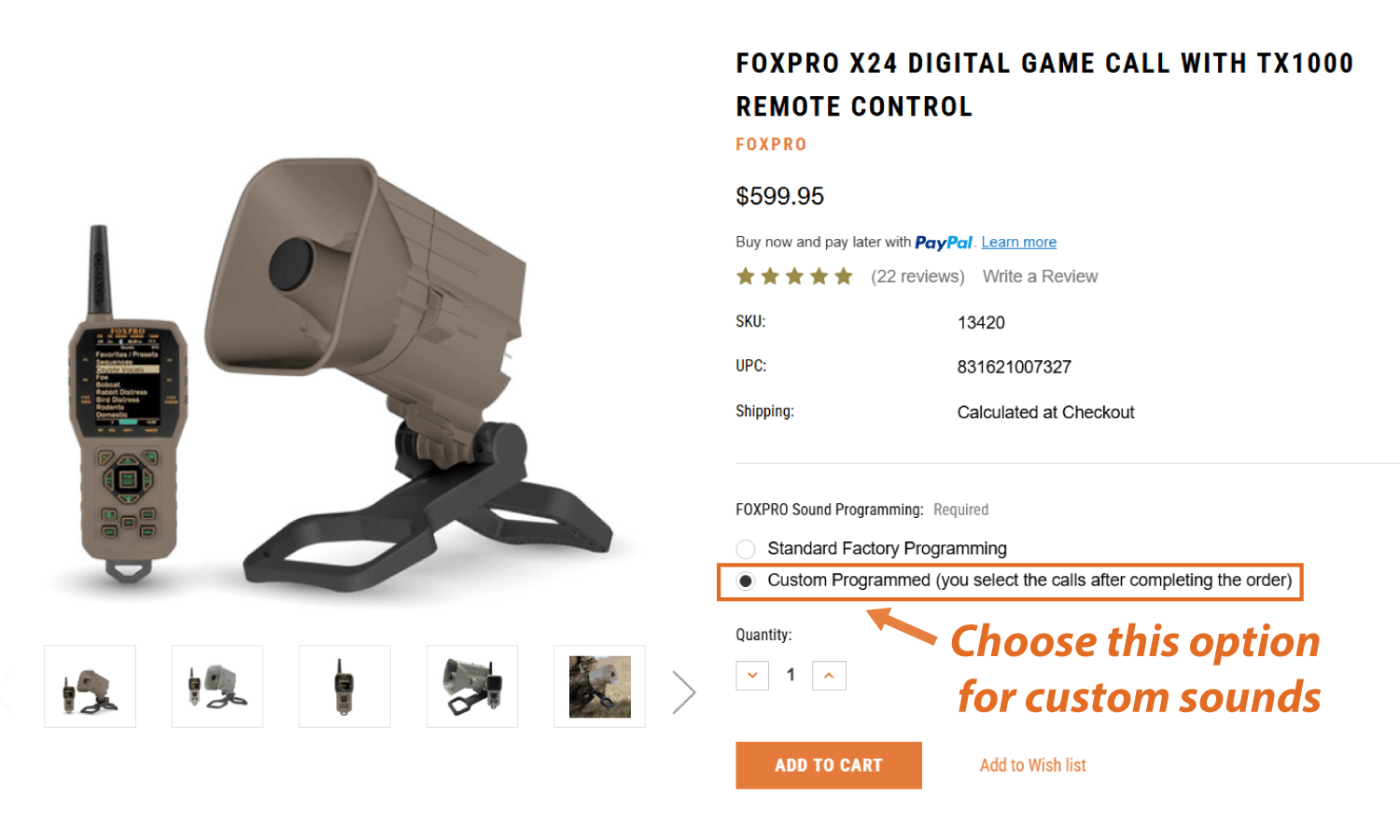
On eligible FOXPRO product pages, the FOXPRO Sound Programming option requires you to choose between:
- Standard Factory Programming
- Custom Programmed (you select the calls after completing the order)
What Standard Factory Programming Means
Standard Factory Programming means the caller ships with the broad sound list FOXPRO normally loads for that model. Because the factory list is designed for many kinds of customers, it can include a mix of predator sounds, game-animal sounds, game-bird sounds, waterfowl sounds, and other recordings. That broad approach is convenient, but an individual hunter may never use a significant portion of the list.
What Custom Programmed Means
Custom Programmed means you want APC to load the eligible new caller with the regular premium FOXPRO sounds selected for your order. You may choose the entire library, choose part of it, or let APC select the complete library around your target species.
After selecting Custom Programmed, simply add the FOXPRO to the cart. You will not select the individual sounds on the product page or in the cart. Finish checkout first. The completed order gives you the order number required for the sound-submittal process.
Step 3: Complete Checkout Before Selecting Sounds
After selecting the programming option, add the caller to your cart and complete the normal checkout process. This is also the best time to review the rest of your predator-hunting system so the shipment arrives with the accessories you need.
Common Add-On Items to Consider Before Checkout
- Electronic call accessories, including compatible carry, power, battery, and charging items.
- Predator decoys to create a visual focal point near the sound source.
- Predator calls and backup mouth calls for added sound flexibility.
- Hunting lights for legal night hunting applications.
- Hunting sticks and tripods for stable shooting support.
- Seats and stools for comfortable daytime calling stands.
- Head nets and gloves to reduce exposed skin and visible movement.
Many FOXPRO callers can put an order near or above AllPredatorCalls.com's free-shipping threshold, so combining the caller with accessories you already need can help you make better use of the shipment. Always verify the current shipping terms shown on the site during checkout.
The sound-submittal form asks for your order number. That number does not exist until the online order is completed, which is why the workflow is buy first, choose sounds second.
Step 4: Select Your Custom FOXPRO Sounds
After checkout, choose the method that fits how much control you want over the library. There is no requirement that every customer research and choose every sound personally.
Option A: Pick Every Sound Yourself
Choose the full premium library one sound at a time. This is best for hunters who already know the sounds they want, enjoy building libraries, or have very specific species and regional preferences.
Option B: Pick Some, Let APC Finish
Choose the must-have sounds you know you want, then ask APC to fill the remaining premium slots with complementary sounds for the predators, game animals, or birds you hunt.
Option C: Let APC Pick Everything
Tell APC what you hunt and let the experienced predator-hunting staff build the premium library for you. This is the easiest option for a customer who wants a useful ready-to-hunt sound list without researching hundreds of recordings.
How to Tell APC Which Species You Hunt
If APC is choosing some or all of the library, you can provide your interests in several ways:
- Add an Order Comment during checkout, such as “Program this for coyote, red fox, bobcat, deer, and turkey.”
- Reply to the order confirmation email with your hunting interests.
- Email sales@allpredatorcalls.com. Include your full name, the name on the order if different, and the order number.
- Call APC toll free at 888-826-9683 after the order is placed.
A customer can provide a detailed plan such as “mostly coyotes in open Western country with some bobcats,” or simply say “coyote and fox.” APC can use the information you provide to create a practical library rather than requiring you to become a FOXPRO sound expert before buying the caller.
How to Use the FOXPRO Custom Sound Submittal Form
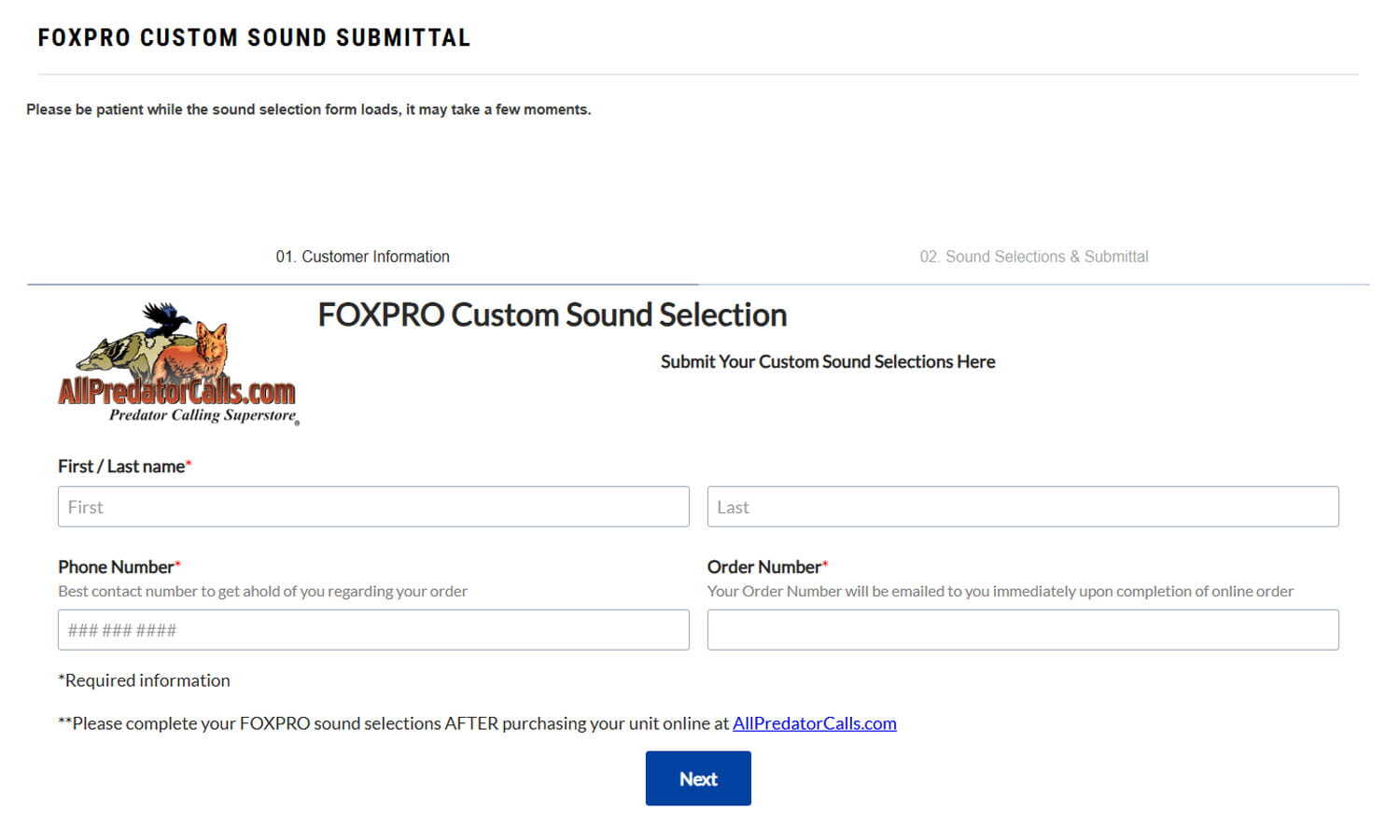
The preferred online method is FOXPRO Custom Sound Submittal. The first page asks for the information APC needs to match the sound selection with the correct order.
Information Required on the First Screen
- First Name
- Last Name
- Phone Number so APC can contact you if there is a question about the order or sound submission.
- Order Number from the completed AllPredatorCalls.com purchase.
After entering the required information, select Next. The sound-selection page will load and display the available sounds in categories.
Return to the AllPredatorCalls.com checkout and finish the purchase. The sound-submittal form is intentionally a post-purchase process because the order number is how APC links the sound list to the correct new FOXPRO.
How the FOXPRO Sound Selection Screen Works
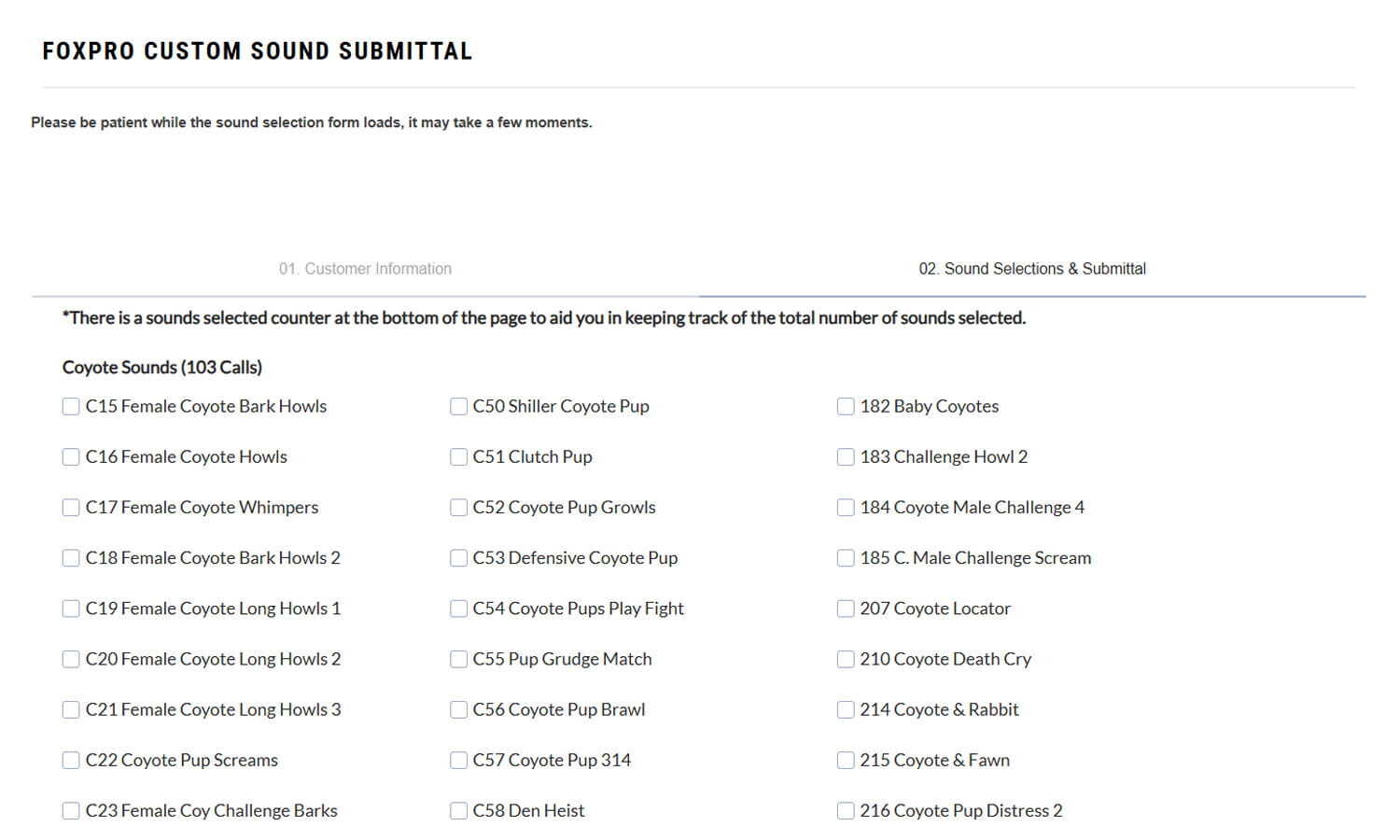
The sound-selection screen is organized by species and sound type. Each entry shows the FOXPRO sound identification number, the sound name, and a checkbox.
Why the Sound ID Matters
When using the online form, the checkbox is attached to the exact sound. When submitting a list by email or reading sounds by phone, however, include the unique FOXPRO identification number and the sound name.
For example:
- 207 Coyote Locator — “207” is the unique sound ID and “Coyote Locator” is the sound name.
- L66 Mrs McCottontail — “L66” is the unique sound ID and “Mrs McCottontail” is the sound name.
Sound names can be similar. The identification number prevents confusion and helps APC load the exact recording requested.
Other Ways to Submit a Complete Sound List
- Reply to the order confirmation email: Send the sound ID and name for each selection.
- Email sales@allpredatorcalls.com: Include your full name, order number, and the sound ID plus name for each sound.
- Call 888-826-9683: Read the sound ID and name one at a time. Phone submission is available for customers who prefer it, although a long list can take significantly more time to communicate and record accurately.
How to Include or Exclude the FOXPRO Free Bonus Sounds
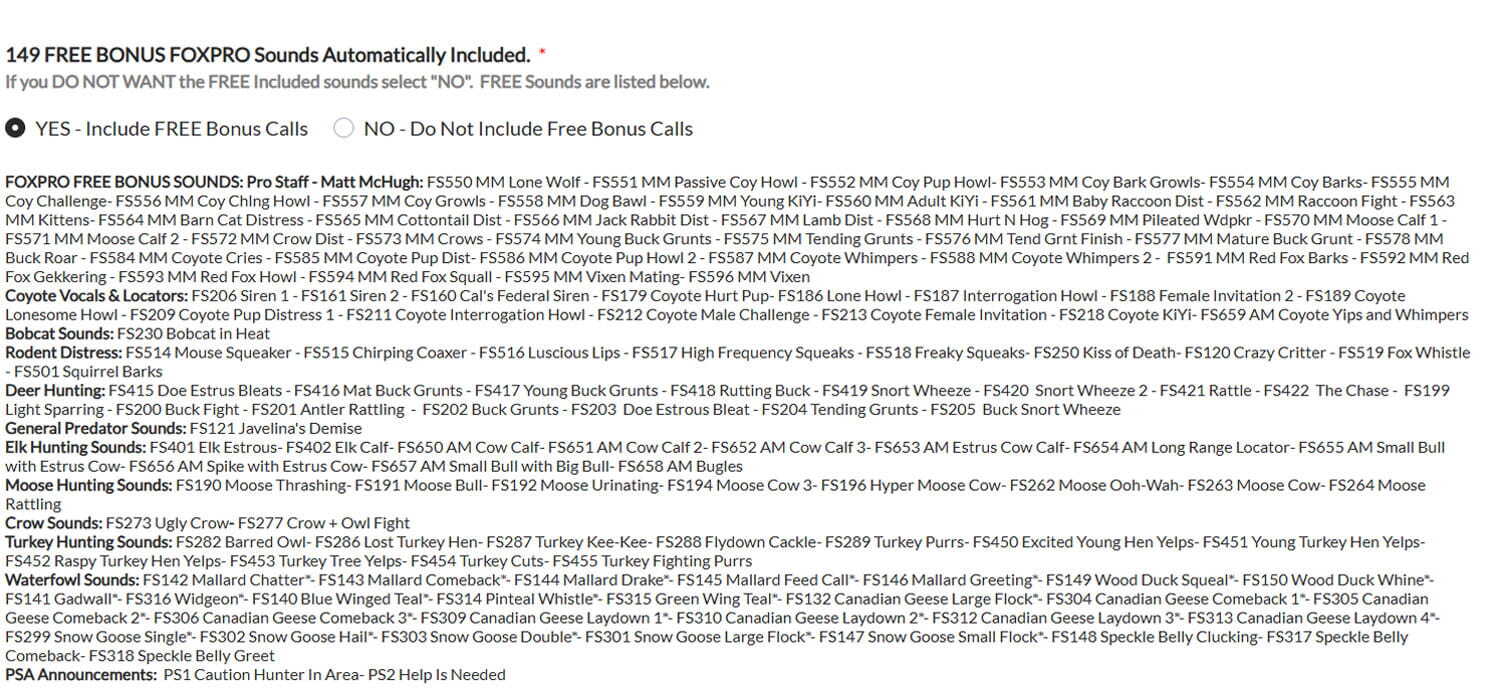
If the customer does nothing, the default Yes – Include FREE Bonus Calls selection remains active and APC will include the free bonus library. Customers who do not want the free library should actively select No – Do Not Include FREE Bonus Calls.
How APC Handles the Free Library
- The entire free bonus package is included when selected.
- Customers do not choose individual free sounds one at a time.
- Free sounds do not count against the premium-sound allotment.
- Free sounds cannot be exchanged for additional premium sounds.
- APC keeps the free sounds segregated from the premium sounds on the caller so customers can tell which library they are browsing.
Programming Notes, Sound Counter, Model Allotments, Verification, and Submit
The bottom of the sound-selection form contains several controls that are easy to overlook but are important to a successful submission.
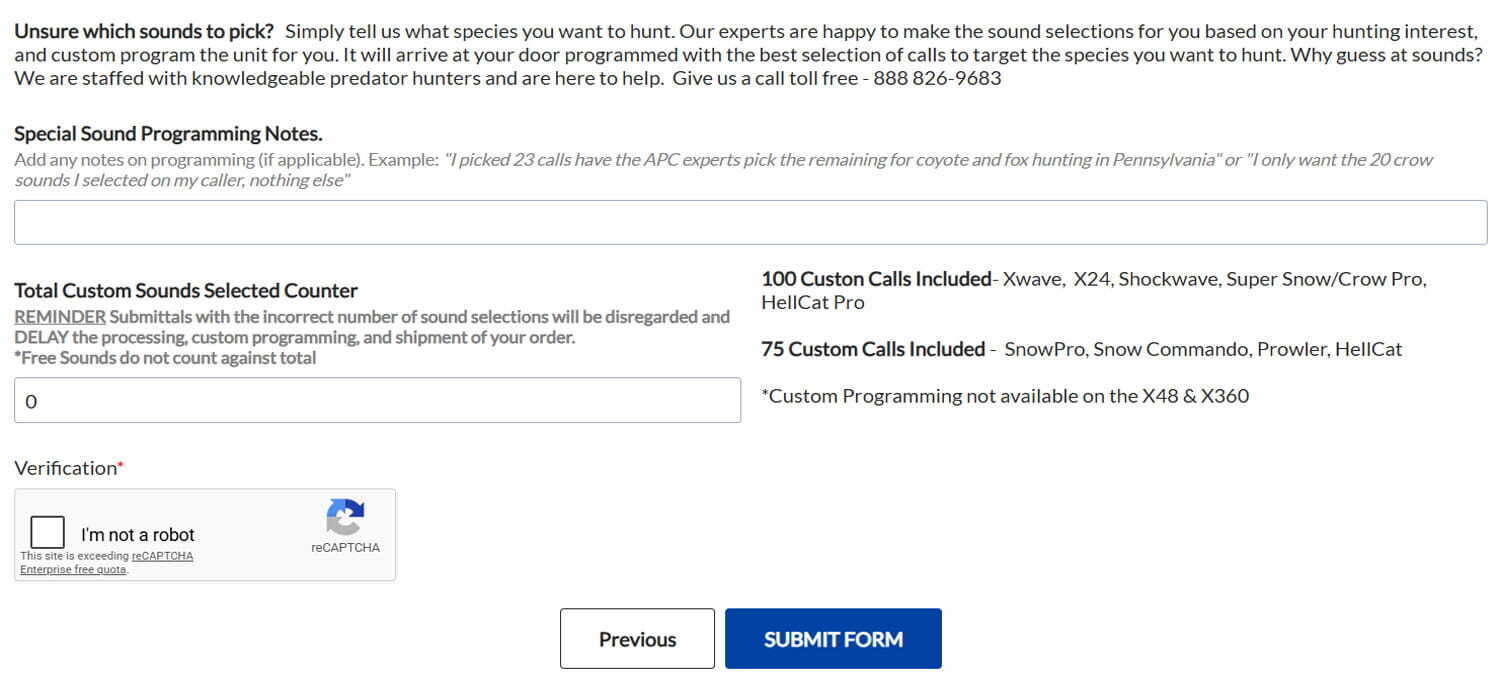
Special Sound Programming Notes
Use the notes field for instructions that are not obvious from the selected checkboxes. Examples include:
- “I picked 23 calls; have the APC experts pick the remaining sounds for coyote and fox hunting in Pennsylvania.”
- “I only want the 20 crow sounds I selected on my caller, nothing else.”
- “Please focus the remaining sounds on bobcat and gray fox.”
- “I want a simple library with fewer sounds and less remote clutter.”
Total Custom Sounds Selected Counter
The built-in counter tracks how many premium sounds you have checked. Compare that number to the current allotment shown for your model on the live form.
You may select fewer than the maximum. Some hunters prefer a smaller library because fewer entries can make categories and remote navigation simpler. You cannot use the form to receive more premium sounds than the model allows. If too many premium sounds are submitted, APC will contact you so the list can be corrected.
Model Allotments
The sound-submittal page lists the current eligible models and the number of premium custom sounds included with each. Use the live form as the current source of truth because model offerings and allotments can change over time.
Human Verification Is Required
The human-verification checkbox must be completed before the form will successfully submit to APC. If the verification is skipped, the sound list is not sent. Complete the verification and then select Submit Form.
You Can Also Reach the Sound Selection Page From Your Order Confirmation Email
The order confirmation provides an easy return path to the custom sound-submittal process. Toward the bottom of the email, customers with FOXPRO game callers will see an attention notice with a link to the FOXPRO Sound Selection Page.

The same page can also be found in the AllPredatorCalls.com footer under Further Info → FOXPRO Custom Sound Submittal.
Want to See the FOXPRO Sound List Before You Buy?
You do not have to wait until after checkout to research the available sounds. The FOXPRO Sounds Master List is designed specifically for customers who want to browse the available library before placing an order.
Use the Master List to Plan
- Identify must-have coyote vocals before buying.
- Compare rabbit, rodent, bird, fawn, and other prey-distress options.
- Look for red fox, gray fox, bobcat, raccoon, hog, mountain lion, crow, turkey, deer, and other relevant sound groups.
- Create a short list of favorites before the order is placed.
- Decide whether you want to choose the complete library or have APC help finish it.
For deeper strategy on choosing what belongs in a predator-calling library, continue through the Predator Sounds Guide, What Sounds to Play and When to Play Them, and Electronic Calling Techniques.
How AllPredatorCalls.com Organizes Sounds on a Custom FOXPRO
Customers often ask what the finished caller looks like after programming. FOXPRO remotes use a category-based sound system. Instead of scrolling through one enormous flat list, the user navigates to a category and then opens that category to see its individual sounds.
APC organizes the finished caller in a similar way to the sound-selection page. Coyote sounds belong in coyote-oriented categories, rabbit sounds in rabbit-distress categories, and other recordings in the appropriate species or sound-type groups.
Why Category Organization Matters
- Faster remote navigation: Find the type of sound before searching for the individual recording.
- Better field organization: The sound list follows a predictable structure rather than an arbitrary sequence.
- Easier sequence building: Related sounds remain grouped when switching among vocals, prey distress, pup distress, bird sounds, or other categories.
- Clearer separation of free sounds: APC can keep the free bonus library separate from the premium library so the customer knows which group is being used.
Organization is part of usability. The most valuable caller is not just the one with the right sounds; it is the one that lets the hunter find those sounds quickly when an animal is approaching and attention needs to stay on the stand.
How to Build a Better Custom FOXPRO Sound Library
The strongest library is built around hunting situations, not around the goal of filling every available slot. Start with the predators and game you actually hunt, then give each important species enough variety to cover multiple motivations and stand conditions.
Coyote-Focused Library
A coyote-focused library can combine coyote vocals, rabbit and hare distress, rodents, birds, fawn or other regional prey, pup distress, fight sounds, and specialty sounds. The exact balance depends on season, hunting pressure, terrain, and how aggressively the hunter uses vocalizations.
Fox-Focused Library
Red and gray fox hunters may emphasize high-value prey distress, bird distress, rodents, fox distress, fox vocalizations, and close-range or high-frequency sounds. The best mix can differ between open-country red fox hunting and tight-cover gray fox calling.
Bobcat-Focused Library
Bobcat hunters often benefit from variety among bird, rabbit, rodent, and other prey sounds because long stands may require sound changes without abandoning the overall prey story. Bobcat-specific sounds can be added where appropriate.
Hog and Raccoon Libraries
Hunters targeting hogs or raccoons can reserve premium slots for species-specific distress, fighting, social, feeding, or other relevant sounds rather than accepting a predator-only library that does not match the intended use.
Multi-Species Library
For hunters who pursue several predators, the goal is balance. Build core categories that work across species, then reserve part of the library for specialized vocals and target-specific sounds.
| Library Goal | Best Approach | Why It Works | Common Mistake |
|---|---|---|---|
| Maximum personal control | Select every premium sound yourself | You decide exactly which recordings occupy the caller | Choosing many near-duplicate sounds while leaving major categories uncovered |
| Expert-assisted custom library | Choose must-have sounds and let APC finish the list | Combines your favorites with a more balanced supporting library | Failing to tell APC your target species, region, or hunting priorities |
| Fastest and easiest process | Tell APC what you hunt and let the staff choose the library | Removes the need to research hundreds of recordings | Being too vague when you actually have very specific needs |
| Simple remote navigation | Choose fewer than the maximum when appropriate | Reduces clutter and keeps categories focused | Assuming every available slot must be filled |
Continue learning with What Sounds to Play and When to Play Them, Coyote Calling Sequences, Red Fox Calling Sequences, Gray Fox Calling Sequences, Bobcat Calling Sequences, and Mountain Lion Calling Sequences.
Complete Custom FOXPRO Buying and Programming Process
Choose the FOXPRO model that fits your hunting
Choose the FOXPRO electronic caller that best matches your budget, target species, size and weight requirements, needed volume, sound quality expectations, number of included sounds, remote quality, features, accessories, and overall value. AllPredatorCalls.com staff can help compare models before you order.
Select the Custom Programmed option on the product page
Open the FOXPRO model on AllPredatorCalls.com and choose “Custom Programmed (you select the calls after completing the order)” under FOXPRO Sound Programming. Do not try to choose sounds yet; sound selection happens after checkout.
Add the caller and any needed accessories to your cart
Add the caller to your cart and consider adding the accessories you will need in the field, such as electronic-call accessories, batteries or chargers, decoys, mouth calls, hunting lights, hunting sticks or tripods, head nets, gloves, seats, or stools. Then proceed to checkout.
Complete checkout and get your order number
Finish the online checkout process before selecting custom sounds. Your order confirmation supplies the order number required by the FOXPRO Custom Sound Submittal form.
Choose how you want your sound library built
Choose one of three methods: select every premium sound yourself, select some sounds and ask AllPredatorCalls.com to fill the remaining slots, or tell the staff your target species and have the experienced predator-hunting team build the entire library for you.
Submit your sound selections or programming instructions
Use the FOXPRO Custom Sound Submittal page, reply to your order confirmation email, email AllPredatorCalls.com with your name and order number, or call the store. When submitting individual sounds by email or phone, include each FOXPRO sound identification number and sound name so the correct recording is programmed.
AllPredatorCalls.com programs and organizes the new caller
AllPredatorCalls.com loads the selected premium sounds, includes the free bonus sounds when requested, organizes sounds into practical categories, programs the new FOXPRO, and prepares it so the caller arrives ready to use without the customer having to connect the new unit to a computer to load the selected library.
AllPredatorCalls.com staff can help with caller selection, programming choices, sound-library planning, target-species recommendations, or questions about the sound-submittal process. Call 888-826-9683 or email sales@allpredatorcalls.com.
Already Own a FOXPRO and Want to Add or Rearrange Sounds?
That is a different process from the service described on this page. APC's custom programming is for eligible new FOXPRO callers purchased from AllPredatorCalls.com. APC does not provide a reprogramming service for used FOXPROs or callers purchased from other retailers.
High-Level Existing-Caller Process
- Purchase and download the desired sound directly from FOXPRO or another compatible sound seller. For third-party sounds, use a format supported by the caller and FOXPRO programming process, commonly MP3 or WAV where applicable.
- Download the appropriate FOXPRO programming utility for the specific caller. Some models may use different software or processes, so confirm the correct current utility with FOXPRO.
- Connect the FOXPRO caller to the computer with the appropriate USB cable.
- Use the programming utility to add the sounds from the computer to the caller. Adding new sounds at the end of the existing list can simplify later category organization compared with inserting them throughout the list.
- Update the caller's categories so the new sounds appear in the correct groups or create new categories as needed.
- Save changes when prompted and safely eject the caller from the computer before unplugging the USB cable.
- Turn on the caller and remote and update or synchronize the remote with the caller using the procedure in that model's manual.
For help adding, rearranging, purchasing, or troubleshooting sounds on an existing FOXPRO, contact FOXPRO directly. Current public FOXPRO general contact information: General Inquiries: 717-248-2507, Toll Free Ordering: 866-463-6977, Email: sales@gofoxpro.com, and Website: gofoxpro.com.
APC cannot sell individual FOXPRO premium sounds for an existing caller. Customers who need additional FOXPRO premium sounds should purchase them directly from FOXPRO.
Continue Learning About Electronic Calling and Predator Sounds
Custom programming is most valuable when the library is connected to a sound strategy. Continue through the Electronic Calling Guide and Predator Sounds Guide to learn how caller features, sound selection, sequences, volume, placement, and predator behavior work together.
Build a Better FOXPRO Calling System
Start with the right caller, then add the accessories and hunting equipment that make the complete system easier to carry, operate, position, and use in the field.
Frequently Asked Questions About Custom FOXPRO Programming
These answers cover custom FOXPRO ordering, premium sound selection, free bonus sounds, order numbers, sound IDs, programming notes, library organization, APC sound-selection help, existing callers, and the difference between new-caller programming and reprogramming a caller you already own.
Custom FOXPRO programming is a service for eligible new FOXPRO electronic callers purchased from AllPredatorCalls.com. Instead of receiving only the standard factory sound list, the customer can choose the regular premium FOXPRO sounds they want, choose part of the library and let APC complete it, or have APC build the library around the species they hunt. APC then programs and organizes the new caller before it ships.
Custom programming lets the hunter use the caller’s available premium-sound capacity for sounds that match the species and situations they actually hunt. Standard factory programming is intentionally broad and may include predator, game-animal, game-bird, and waterfowl sounds that a particular hunter may never use. Custom programming can make the caller more useful immediately and can reduce the need to buy additional premium sounds later.
For eligible FOXPRO callers sold with the custom-programming option, APC’s custom selection and programming process is part of the purchase option shown on the product page. The value comes from choosing the premium sounds included with that model and having APC load and organize them before shipment.
Yes. Visit the FOXPRO Sounds Master List at /foxpro-sounds-master-list/ to review available sounds before purchasing. The master list is useful for planning, while the FOXPRO Custom Sound Submittal page is the post-purchase form used to submit selections after you have an order number.
The online sound-submittal form requires the order number from your completed purchase so APC can match the submitted sound list to the correct caller and customer. The order number is supplied in the order confirmation after checkout.
Your order confirmation is emailed after the online order is completed. The order or invoice number appears in that confirmation and is used on the FOXPRO Custom Sound Submittal form.
No. You can select every premium sound yourself, select only the sounds you know you want and ask APC to complete the remaining library, or tell APC the species you plan to hunt and have the experienced predator-hunting staff select the library for you.
The preferred method is the FOXPRO Custom Sound Submittal page at /foxpro-custom-sound-submittal/. You can also reply to your order confirmation with a sound list, email the list to sales@allpredatorcalls.com with your full name and order number, or call 888-826-9683 and provide the selections by phone.
FOXPRO sounds can have similar names. The unique sound identification number helps APC identify the exact recording you want. For example, “207 Coyote Locator” uses 207 as the sound ID, while “L66 Mrs McCottontail” uses L66 as the sound ID. When submitting selections by email or phone, provide both the ID and the sound name.
Each eligible model has a specific custom premium-sound allotment shown on the live sound-selection form. If more than the allowed number is submitted, APC will contact you and ask you to reduce or redo the selection so it matches the model’s allotment.
Yes. Some hunters intentionally choose fewer sounds to reduce library clutter and make the remote easier to navigate. You do not have to fill every available premium-sound slot if a smaller, more focused library better fits how you hunt.
In this guide, premium or regular FOXPRO sounds refers to the main FOXPRO sound library used for the customer’s custom allotment. FOXPRO promotes its premium library as live-animal recordings. These are the sounds customers are choosing when they select the Custom Programmed option, and additional premium sounds purchased later are sold by FOXPRO.
FOXPRO’s free bonus sounds are a separate library of older and other bonus recordings that are not part of the customer’s premium custom-sound allotment. They may include predator, game-animal, bird, and other sounds. APC can include the complete free bonus library in addition to the premium selections, and the free sounds are kept segregated from the premium library on the caller.
On APC’s sound-submittal form, the option to include the free bonus calls is selected by default. If you want the free bonus library, leave the default selection in place. If you do not want the free sounds, actively choose the option that says not to include them before submitting the form.
No. Free bonus sounds cannot be substituted for additional premium sounds. If you want premium sounds beyond the number included with your caller’s custom-programming allotment, those additional premium sounds must be purchased directly from FOXPRO.
No. When APC includes the free bonus library, the complete free-sound package is added rather than allowing individual free sounds to be substituted or selected one by one. APC keeps those free sounds separated from the premium library so the two groups are easy to distinguish.
APC organizes sounds into categories by species or sound type, similar to the way the sound-selection page is organized. A remote user first opens a category such as Coyote Vocals or Rabbit Distress and then selects an individual sound inside that category. The goal is to make the finished library easier to navigate in the field.
Yes. The sound-submittal form includes a Special Sound Programming Notes field. You can use it for instructions such as asking APC to choose the remaining sounds for specific species or stating that you only want the exact sounds you selected and nothing else.
The human-verification box must be completed before the sound-submittal form is successfully sent. If the verification is not completed, the form will not submit to APC. Complete the verification and then use the Submit Form button.
Yes. Tell APC the species you intend to hunt in the Order Comments field, by replying to your confirmation email, by emailing sales@allpredatorcalls.com with your name and order number, or by calling after the order. APC’s predator-hunting staff can then build the premium library around those interests.
Yes. Pick the must-have sounds you already know you want, then use the programming notes, email, or phone to ask APC to fill the remaining premium slots with complementary sounds for your target species and hunting style.
No. This page explains the buying and custom sound-selection process for a new eligible FOXPRO purchased from AllPredatorCalls.com. It is not a reprogramming guide for an existing FOXPRO, a used caller, or a caller purchased from another retailer.
No. APC programs new eligible FOXPRO callers purchased from AllPredatorCalls.com. Existing-caller sound purchases, reprogramming, troubleshooting, and sound-library changes should be handled through FOXPRO.
No. Customers who already own a FOXPRO and want additional premium sounds should purchase those sounds directly from FOXPRO. APC’s custom programming service applies to eligible new FOXPRO callers purchased from AllPredatorCalls.com.
FOXPRO sounds are intended for FOXPRO callers and should not be treated as a cross-brand sound library for other manufacturers’ electronic callers.